What Is a Virtual Card? How It Works and How to Get One
A virtual card is a digital-only card number that protects your real account. Learn how virtual cards work, their benefits, and how to create one.
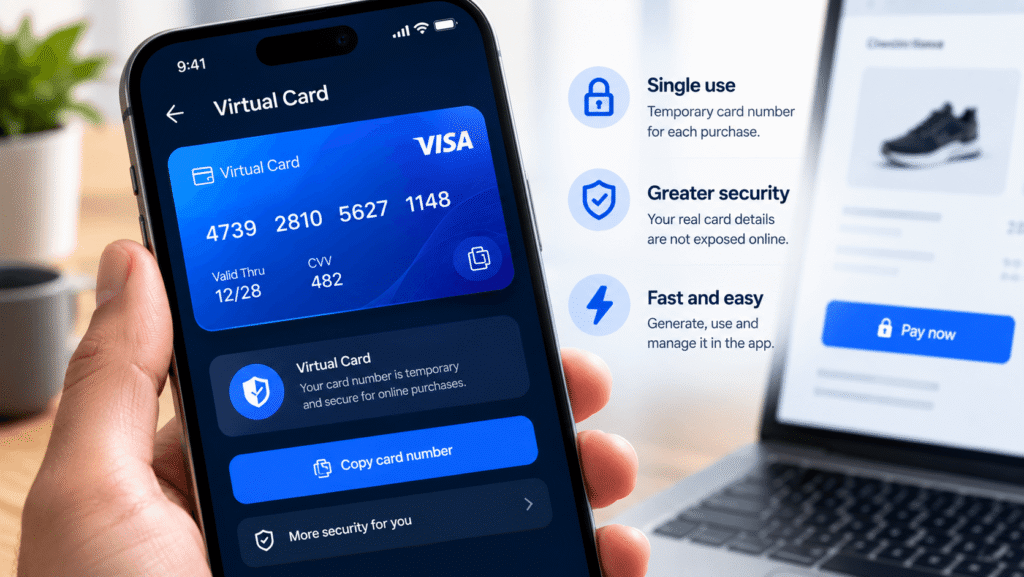
A virtual card is a digitally generated payment credential — a card number, expiration date, and security code — that functions like a physical debit or credit card but exists only in electronic form. It is typically linked to an existing bank account, credit line, or prepaid balance, and it can be created instantly through a bank’s app, a card issuer’s browser extension, or a digital wallet. Because the virtual number is separate from a person’s actual account number, merchants never see the underlying card details, which limits the damage if that number is ever exposed in a data breach.
Key Facts
- A virtual card generates a unique card number, expiration date, and CVV that draws on the same underlying account or credit line as a person’s real card, while looking identical to a normal card at checkout.
- Many issuers allow virtual card numbers to be locked to a single merchant, capped at a set spending limit, or set to expire after one use.
- Major U.S. card issuers offering consumer virtual card numbers include Capital One (through its Eno browser extension), Citi, and Bank of America, alongside network-level tools like Click to Pay.
- Virtual cards can also be loaded into digital wallets such as Apple Pay, Google Pay, and Samsung Wallet for use in both online and contactless in-person payments.
- On the business side, virtual cards are increasingly used for accounts payable, vendor payments, and subscription management, with global B2B virtual card payment volume reported in the trillions of dollars and continuing to grow.
How a Virtual Card Works
A virtual card is issued by a bank, credit card company, or dedicated virtual card provider and is tied to an existing account — a credit card, debit account, or prepaid balance. When a person requests a virtual card, the issuer generates a new 16-digit number, expiration date, and CVV that is distinct from their physical card’s details but draws on the same funds or credit line.
At checkout, the virtual card number is entered exactly as a physical card would be. The transaction processes normally through the card network (Visa, Mastercard, American Express, or Discover), and any purchase is billed to the same underlying account — meaning rewards, statement records, and credit reporting generally reflect the real account rather than the virtual number itself.
What differs is control. Depending on the issuer, a virtual card can be:
- Merchant-locked, so the number only works at the specific retailer it was created for.
- Spending-capped, limiting the maximum amount that can be charged.
- Single-use or time-limited, automatically expiring after one transaction or a set period.
- Closed or regenerated on demand, without needing to cancel or replace the underlying physical card.
This last point is one of the more practical advantages: if a virtual card number is compromised or a merchant is discontinued, an issuer can shut down that specific number without disrupting every other subscription or automatic payment tied to the real card.
How to Get a Virtual Card
The exact steps vary by provider, but the general process for a consumer virtual card looks similar across issuers:
- Check whether an existing card is eligible. Not every credit or debit card supports virtual numbers — availability depends on the issuer and sometimes the specific card product.
- Enroll through the issuer’s app, website, or browser extension. Capital One, for example, offers virtual card numbers through its Eno browser extension, available for major browsers after logging in and verifying an existing account.
- Generate a card number for a specific purchase or merchant. Many tools create the number automatically at a checkout page, or allow a person to generate one manually from a dashboard.
- Set any desired controls, such as a spending limit or single-use restriction, if the issuer supports them.
- Use the number at checkout the same way a physical card would be used, then manage, freeze, or delete it later from the same dashboard.
Card network tools like Click to Pay work somewhat differently: rather than being tied to one issuer, Click to Pay lets a cardholder enroll a card from any of the four major networks and automatically generates a virtual number, paired with a transaction-specific code, at participating merchants.
Digital wallets add another layer. Apple Pay, Google Pay, and Samsung Wallet use tokenization — a related but distinct technique — to replace a stored card’s real number with a device-specific token for in-app, in-store, and some online purchases. Some issuers, including Capital One, let eligible cardholders select a dedicated virtual card directly from within a digital wallet’s autofill options for added protection at checkout.
Common Uses for Virtual Cards
For individual consumers:
- Shopping at unfamiliar or one-time online retailers without exposing a primary card number.
- Managing free trials and recurring subscriptions, since a capped or single-use virtual card can prevent unwanted renewal charges.
- Adding an extra layer of protection for high-value or high-risk purchases.
For businesses:
- Accounts payable and vendor payments, replacing paper checks with trackable, faster digital payments.
- Subscription and SaaS management, assigning a dedicated virtual card to each recurring vendor for easier tracking and cancellation.
- Departmental or project budgets, issuing cards with preset spending limits to specific teams.
- Contractor and gig-worker payments, offering a controlled way to pay non-employees without sharing broader account access.
- Travel bookings, where a virtual card can be issued and locked to a specific vendor or trip at the point of booking.
Virtual Cards vs. Physical Cards
The core difference is exposure and control rather than function. A physical card exposes the same static number to every merchant it’s used with, so a single point of compromise — a skimmer, a data breach, a lost card — can affect every transaction tied to that number. A virtual card isolates that risk: each number can be restricted to a specific use, and compromising one virtual number does not expose the underlying account or any other virtual numbers generated from it.
The trade-off is acceptance and convenience. Some merchants, particularly for in-person or card-present transactions, may not support virtual numbers, and not every card issuer offers the feature. Physical cards remain necessary for ATM withdrawals and for the (now rarer) card-present terminals that require a physical chip or swipe.
Security Considerations
Virtual cards are generally considered a meaningful security improvement over sharing a primary card number repeatedly online, since a breach at any single merchant only exposes a limited-use number rather than the underlying account. That said, virtual cards do not eliminate risk entirely:
- The underlying account can still be affected if a person’s login credentials to the issuer’s app or browser extension are compromised.
- Not all “virtual card” tools work the same way. Some are single-use and merchant-locked; others are simply a static alternate number without spending controls — it’s worth checking exactly what protections a specific issuer’s tool provides before relying on it.
- Closing a physical card typically invalidates its associated virtual numbers, so a person switching or canceling a physical card should expect any linked virtual cards or saved merchant billing information to need updating.
Frequently Asked Questions
Is a virtual card the same as a digital wallet? No. A digital wallet (such as Apple Pay or Google Pay) is a way to store and use card information for contactless or in-app payments, typically through tokenization. A virtual card is a distinct, separate card number generated by an issuer, which can sometimes be loaded into a digital wallet for added flexibility.
Do virtual card purchases earn the same rewards as a physical card? Generally yes, since a virtual card draws on the same underlying account or credit line — rewards, statement records, and credit reporting typically reflect the real account rather than the virtual number itself. Cardholders should confirm this with their specific issuer, as terms can vary.
Can I get a virtual card without a bank account? Prepaid virtual cards are available from some providers without requiring a traditional bank account, though these operate differently from a virtual number tied to an existing credit or debit card and may carry their own fees or loading requirements.
What happens if my virtual card number is stolen? If a virtual card is merchant-locked or single-use, a stolen number is generally far less useful to a fraudster than a stolen physical card number, since it may not work anywhere else or may already be expired. Most issuers also allow a compromised virtual card to be closed or regenerated instantly without affecting the underlying account or physical card.
Are virtual cards accepted everywhere physical cards are? Not always. Acceptance depends on the merchant and the specific tool being used — some in-person, card-present terminals may not support virtual numbers, and certain merchants’ payment systems may reject them due to address-verification mismatches or other checks.
Disclaimer: This article is for informational purposes only and does not constitute financial, investment, or legal advice. Global Crypto 360 does not endorse any specific card issuer, provider, or platform mentioned. Always conduct your own research (DYOR) and review your card issuer’s specific terms before relying on any feature described here.